
Links to the passage
Text-fragment links can bring the reader back to highlighted words, not just the top of a page. Highlighting depends on the destination page and the reader's browser.
 CitationTool
1AlgorithmicArtisan / Chrome extension
Turn a web selection into a citation and a link back to the exact passage. Less hunting for the source. More context for the reader.
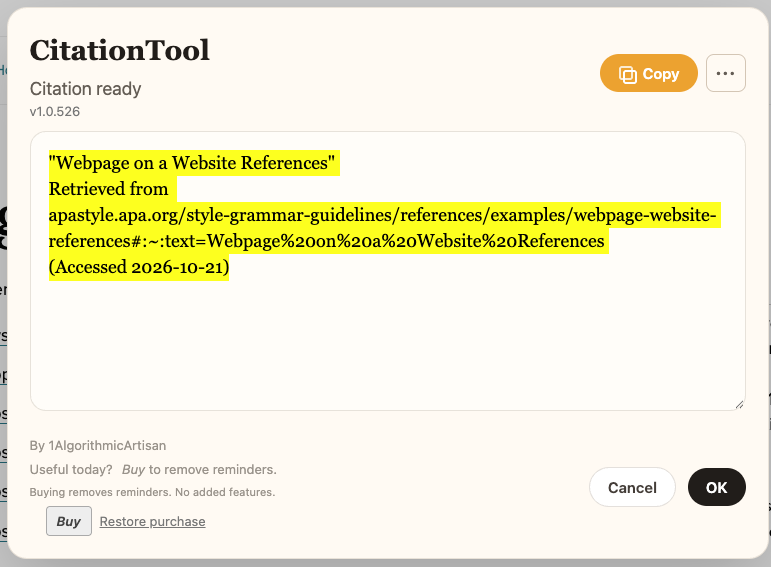
From selection to source
Highlight the words you want to quote on an HTML webpage.
Use the right-click menu, or assign CitationTool a shortcut at chrome://extensions/shortcuts.
Paste the copied citation, review the Citation Ready dialog, or choose files to save.
Select text → Control-click / right-click → CitationTool → Copy Link to Highlight → paste into your email.
Send a Very Deep Link (VDL) to the words, phrase, or passage you mean. The recipient can open the source with those words highlighted in context, where supported. “That thing there.” You can paste the same link into a message or document.

Text-fragment links can bring the reader back to highlighted words, not just the top of a page. Highlighting depends on the destination page and the reader's browser.
APA-ish, MLA, Chicago, Harvard, and simple web citation options use available page metadata. Check author, date, and publication details before submitting academic work.
Citation text is formatted in your browser and copied or downloaded locally. You decide where to paste, save, or share it.
Take your citation with you
Your citation. Your files. Every automatic save is optional. Every format can also be saved manually.
Click CitationTool's toolbar icon to open Settings. Check the file types you want saved with each citation. Uncheck any you don't want—or turn them all off and just use the clipboard and citation dialog. Changes save immediately and apply to your next citation.
.txt) and HTML (.html)..bib), PowerPoint (.pptx) and JSONL (.jsonl).In the citation dialog, open ••• → Save as beside Copy. Pick a format for a one-time save: URL/VDL bookmark, TXT, HTML, PDF, BibTeX, PowerPoint, JSONL or RIS. Save as many formats as you need. Manual saves work even when automatic saves are off, and don't change your Settings.
CitationTool can save a VDL bookmark: a .webloc file on macOS or a .url file on Windows. Choose Link to selected text in Save as, or enable URL/VDL bookmarks in Settings. Double-click the file to return to the source with the quoted words highlighted, when the page and browser support it. Keep the quote in context, right where you found it.
All save formats are available for free. Buying removes reminders; it adds no features.
PDF provides visual pages with the original UTF-8 text attached; its page text is not selectable. PowerPoint provides editable quote slides, attribution and a source link, with the full citation in notes. JSONL carries quote, attribution and source data, including fields compatible with ChimeQuotes's existing importer.
Files use CitationTool.<first five words> with the chosen extension. The full quote stays in the file. Another download extension can override filenames; if names look wrong, pause its rename rule and save again. Available metadata is included without inventing missing details; review it before academic use. ChimeQuotes automatic Downloads importing is not included.
Useful nagware
The free version shows a gray label: Nag-ware: Please buy to remove reminders. A Buy button opens the purchase page through ExtensionPay.
The reminder is outside the citation field. It is not added to copied citations or downloaded files. After payment, the reminder and Buy button disappear. Already paid? Use Restore purchase in the dialog or settings.
Purchasing adds no new features; all citation features remain available for free. No registration code to manage. Purchase options are shown at checkout; no price or subscription terms are assumed here.
Social fabric is linkage. A useful link lets someone see what you mean, in context.
In IWasHere and CitationTool, we call a link back to selected words, a phrase, or a passage a Very Deep Link (VDL). For HTML webpages, it uses the browser’s Text Fragments mechanism, described in the URL Fragment Text Directives specification.
The selected text is encoded in the URL fragment using syntax such as #:~:text=selected%20words. A supporting browser can find those words, scroll to them and highlight them on the original page, without the page author having to add an anchor. VDL is our name for the selected-passage link; Text Fragments is the underlying web technology.
IWasHere keeps that link in a local bookmark file. CitationTool includes it with a quote and its source, and can save it as a bookmark too. The link points to the live page; matching and highlighting depend on the browser and the text still being available.
We have fingers; we need to point. A VDL says: that thing there.
Updated October 18, 2026
CitationTool is developed by Jean Tantra / 1AlgorithmicArtisan. Citation creation is local; optional purchases use external payment services.
The extension processes selected text, the current page URL, and available page metadata such as title, author, publication, and date to create citations and deep links. It can highlight text referenced by a link. Selected text and citation content are not sent to the developer, ExtensionPay, or Stripe for citation creation.
Citations are copied to your clipboard. Files are downloaded only for the automatic save formats you enable or the manual saves you choose. Those outputs may contain selected text and source URLs. They remain on your device unless you share them; clipboard history and backups may retain copies. CitationTool does not maintain a remote citation library. Local browser storage remembers your automatic-save choices and temporary download filenames. PDF and PowerPoint generation use libraries bundled with the extension; no remote conversion service receives your quotes. Browser storage also holds payment credentials used by the SDK and a local paid-status cache. The SDK uses browser sync storage where available, with local storage as its fallback.
ExtensionPay receives an installation/payment identifier and technical connection information to check paid status and restore purchases. At checkout, ExtensionPay and Stripe process purchase email and transaction information. Full card details are not available to the extension. Citation content is not included in payment requests.
We keep your purchase email private and use it only for processing purchases, receipts, restoration of paid access, and purchase support. We do not sell it or use it for marketing.
You control clipboard contents and downloaded files. Clear extension storage or uninstall to remove local extension records; downloaded files and browser-synced SDK data may remain separately. Payment providers retain transaction records under their own policies and applicable requirements. Support messages are retained as needed to answer your request and maintain necessary records.
No analytics script is included in this site. When deployed on Netlify, the host processes technical request information to deliver and protect the website; see Netlify's privacy policy. Payment connections use HTTPS. Device records depend on your browser and operating-system security. Do not cite or share confidential text unless you have permission.
Use of information received from Google APIs adheres to the Chrome Web Store User Data Policy, including the Limited Use requirements. Data is used for the described features, not sold, used for advertising, or used to build unrelated browsing profiles.
CitationTool.techSupport@metatheory.com
For a citation issue, include your extension version and the public source URL when possible. Do not email payment-card details or confidential source text.
Was it difficult to get started? Did something fail, or did it simply not fit your workflow?
If you have a moment, tell me what you were trying to do, what you expected and what happened instead. A sentence is enough. Your feedback helps me make CitationTool more useful.
CitationTool.uninstall.feedback@metatheory.com
Feedback is optional. The email link opens your mail app; you choose what to send. Nothing is submitted automatically. Please leave out private page content and payment details.